Why this matters
Cover the exact workflows that move a qualified lead from first contact to a booked appointment without double entry or staff bottlenecks.
Short Answer
For after-hours booking for HVAC companies, prioritize a workflow that can do four things in one motion: qualify the caller, decide whether the issue should be booked or escalated, create the appointment in your scheduling system, and confirm the next step by SMS.
That is the commercially sensible priority because after-hours demand is not just an answering problem. It is a job-conversion problem. When a customer calls at night with a no-heat or no-cool issue, the highest-value outcome is usually not a generic message for the office. It is a qualified next step:
- Emergency escalation when your rules say on-call action is warranted
- A booked appointment when the issue is urgent but not an automatic dispatch
- Complete message capture when the office should review it the next business day
The key is balance. Not every after-hours HVAC request deserves emergency dispatch, but a system that only takes messages often creates avoidable delay, missed revenue, and a messy morning backlog.
If you are buying now, look for an after-hours workflow that can:
- Handle no-heat and no-cool after-hours triage
- Book directly into your existing calendar or FSM
- Apply explicit on-call escalation rules
- Send SMS confirmation to the customer
- Create a clean next-day office handoff without double entry
If a product cannot do those things reliably, it may still help with coverage, but it is closer to message capture than true after-hours booking.
Why This Buying Decision Matters
After-hours demand is a recurring operational issue for many HVAC businesses. The calls often come at night, early morning, weekends, or during weather spikes when the office is already stretched.
That creates two risks at once:
- Revenue risk if high-intent callers do not get a clear next step
- Operational risk if every urgent-sounding call gets pushed to the on-call technician
The real question is not whether someone answers the phone. The real question is whether your business can move an after-hours lead into the right operational lane without confusion.
Common failure points after hours
A weak process usually breaks in predictable ways:
- The customer leaves a voicemail and books with someone else
- The on-call tech gets interrupted for low-priority calls
- The office opens to a pile of half-documented messages
- Customer details have to be re-entered into dispatch software
- No one can tell which callers were promised what
Why seasonal demand makes this more urgent
Hot and cold snaps increase call volume exactly when internal capacity is weakest. That is why more owners are evaluating AI front desk workflows instead of relying only on voicemail, rollover lines, or manual callbacks.
Booking Versus Message Capture: The Core Buying Decision
The biggest mistake in this category is treating all after-hours coverage as equivalent. It is not.
There are two very different outcomes.
Message capture
Message capture means the system collects contact information and a basic summary, then hands the issue to your team later.
That can work if:
- Your office calls back very early every morning
- Your market is not highly competitive after hours
- Your average ticket does not justify more automation
- You want strict human review before anything is scheduled
The downside is simple: it adds time between customer intent and customer commitment. In HVAC, that delay can cost booked jobs.
True after-hours booking
True after-hours booking means the system gathers the right information, follows your rules, books an appointment or triggers the correct escalation, and confirms what happens next.
That is usually the stronger workflow when:
- You get frequent no-heat or no-cool calls
- Your team already uses a scheduling or field service management platform
- You want fewer morning bottlenecks
- You want more consistency in how urgency is handled
For broader context on scheduling workflows, the Booking and Scheduling Hub covers adjacent buying questions. For this use case, the core takeaway stays the same: qualified booking usually beats passive message capture.
The workflow to prioritize
For most HVAC owners, the priority is not “more answering.” It is a workflow that can:
- qualify demand,
- route urgency correctly,
- book the right appointment,
- confirm it by SMS, and
- leave the office with a clean next-day record.
What Strong After-Hours HVAC Workflows Need to Do
A credible after-hours setup should be judged by workflow fit, not generic automation language.
Qualify the call, not just answer it
The system should collect the information your office would need to act immediately:
- Customer name
- Service address
- Callback number
- Existing customer or new customer status, if available
- Equipment type, if part of your process
- Stated issue
- Any urgency indicators relevant to your rules
If a tool cannot gather structured intake data, it will not reduce office workload much.
Handle HVAC-specific urgency rules
For after-hours HVAC calls, the central triage question is rarely “Is this important?” It is:
Is this an emergency now, a bookable urgent call, or a next-day office job?
That requires issue-based logic, especially around:
- No heat
- No cool
- System completely down
- Repeated breakdown reports
- Vulnerability or occupancy concerns, if part of your process
The exact thresholds vary by company, but the workflow has to support them.
Book into the system of record
This is where many solutions separate themselves operationally. If the after-hours workflow cannot place the job where your dispatch team actually works, someone will re-enter it later.
That creates:
- Delays
- Duplicates
- Incomplete notes
- Missed commitments
- Confusion between on-call and office staff
For most buyers, the scheduling or FSM platform should remain the system of record, while the AI front end handles intake and booking against that system. If you are comparing this workflow to other automation approaches, the AI Booking overview is a useful category reference.
Confirm the appointment and next step
The customer should not have to wonder whether the request went through.
A strong workflow sends a clear confirmation by SMS or similar channel that states:
- The appointment window or expected next step
- Whether the issue was escalated to on-call
- Any instructions the customer should expect next
Create a usable next-day office handoff
After-hours booking is not finished when the call ends. The office still needs a clean morning view of:
- What was booked
- What was escalated
- What still requires review
- Which customers were promised follow-up
That handoff is where a lot of operational value is either realized or lost.
Recommended Workflow for After-Hours HVAC Calls
If the goal is booked jobs without chaos, the most practical workflow is:
- Answer immediately
- Collect structured intake
- Run no-heat or no-cool after-hours triage
- Check your booking and escalation rules
- Book the correct appointment or notify on-call
- Send SMS confirmation
- Deliver next-day office handoff inside the scheduling process
Identify the caller and service context
Before urgency decisions, gather the minimum facts required to act intelligently:
- Who is calling?
- Where is the property?
- What problem are they reporting?
- Is the system down entirely or partially?
- Is this residential or commercial work, if your process differs?
Even when a customer says, “It’s an emergency,” your workflow still needs consistent intake.
Triage no-heat and no-cool without overreacting
This is where many owners need more than a simple yes-or-no script. Good triage should separate:
- Calls that clearly match your on-call criteria
- Calls that should be booked into the next available slot
- Calls that need office review because details are incomplete or unusual
The common failure is a binary workflow where every no-heat or no-cool call becomes either a truck roll or a voicemail. Most businesses need a middle lane: qualified urgent booking.
Book using rules, not improvisation
After-hours booking works best when it follows operational rules your team already trusts.
Examples:
- If the issue type matches urgent-but-not-emergency, book the first eligible slot
- If the issue type matches emergency criteria, notify on-call and create the record
- If required information is missing, capture the message and flag it for office review
The more clearly those rules are defined, the more reliable the workflow becomes.
Confirm and document the outcome
Every call should end with a documented outcome:
- Booked appointment
- Escalated to on-call
- Captured for next-day follow-up
That outcome should be visible to both the customer and the office team.
No-Heat and No-Cool After-Hours Triage
This is where HVAC companies need specificity.
No-heat triage
A no-heat call after hours often sounds like an emergency, but the right response depends on your company’s actual policies and service model.
Your workflow should determine:
- Is the system fully down?
- Does the call meet your defined after-hours dispatch rules?
- If not, what is the earliest bookable appointment?
- Has the customer been told clearly whether this is an on-call case or next-available service?
What matters most is consistency. Two callers with similar no-heat issues should not get completely different outcomes just because one reached a human and the other reached an automated workflow.
No-cool triage
No-cool calls can be equally urgent from the customer’s perspective, especially during peak summer demand. But again, not every no-cool request should trigger emergency dispatch.
A better workflow asks:
- Is this a total loss of cooling?
- Does it match your after-hours escalation criteria?
- If not, can it be booked into the earliest qualified slot immediately?
- Has the caller received clear confirmation?
For many HVAC companies, the value is not in labeling everything an emergency. The value is in giving every after-hours caller a confident, documented next step.
The three-lane decision model
A practical after-hours structure usually has three lanes:
- Emergency escalation
- Book now for the earliest available appointment
- Message capture for office review
That protects margins while still converting time-sensitive leads into scheduled work.
Next-Day Office Handoff Without Double Entry
The morning handoff is where owners feel the difference between software that sounds good and software that actually reduces friction.
Your office should not have to sort through disconnected notes, texts, or call summaries to rebuild the night before.
What a clean handoff should include
A strong next-day handoff includes:
- Appointments already sitting in the schedule
- Notes attached to the right customer or job record
- Clear status of any on-call escalations
- Outstanding follow-ups flagged for office action
- Minimal retyping
Why double entry matters
Every extra manual step creates a new failure point. A booked call that still requires re-entry is not fully booked operationally.
For HVAC teams with a dispatcher, CSR, or office manager juggling multiple morning tasks, reducing double entry can be as valuable as increasing answer rate.
Integrations and System-of-Record Questions to Verify
In this category, integration quality is not a side detail. It is the center of the buying decision.
ServiceTitan describes itself as a field service management platform for home service teams covering dispatch, scheduling, and customer workflows. Housecall Pro describes itself as a field service management platform for scheduling, dispatch, invoicing, and customer communication.
That matters because many HVAC businesses already run daily operations through one of these systems or something similar. If after-hours booking sits outside that workflow, the office inherits unnecessary cleanup.
Calendar and FSM depth
Ask whether the tool can:
- Create appointments directly
- Write job notes back into the record
- Trigger dispatch-related workflows
- Respect your scheduling rules
A vendor may mention an integration without making the exact write-back behavior obvious.
Booking accuracy controls
Ask how the system prevents bad bookings:
- Can it limit booking to certain time windows?
- Can it route by service type?
- Can it restrict after-hours bookings to approved slots?
- Can it apply different rules for urgent versus routine calls?
SMS confirmation flow
Ask whether confirmation is:
- Automatic or optional
- Sent immediately after booking
- Logged against the customer record
- Customizable to reflect your after-hours promises
Setup and maintenance questions
The available evidence here is mostly vendor-owned and does not clearly document pricing, implementation effort, or the exact depth of HVAC-specific setup for every product. Buyers should verify who configures scripts, triage rules, escalation logic, and integration mapping before assuming rollout will be low effort.
For a neutral category comparison, you can also review the broader AI Booking framework alongside your own dispatch process.
How Current Vendor Evidence Maps to the Market
The named products below are best treated as examples from the currently verified evidence set, not a definitive ranked shortlist.
Sameday
Sameday describes itself as an AI receptionist and scheduling product for home service businesses and states integrations with ServiceTitan and Housecall Pro. For an HVAC buyer, that is relevant because it points directly at the after-hours intake-to-booking layer rather than the core FSM itself.
ServiceTitan
ServiceTitan describes itself as a field service management platform for home service teams. In this decision, it makes the most sense to view ServiceTitan as the operational backbone many HVAC teams may already use, not automatically as the complete after-hours AI workflow by itself.
Housecall Pro
Housecall Pro describes itself as a field service management platform for scheduling, dispatch, invoicing, and customer communication. The same logic applies: it is highly relevant as the system where jobs and customer records live, but buyers should still verify how after-hours AI intake and booking would be handled in practice.
AgentZap
AgentZap describes itself as AI receptionist software and, in the supplied material, shows plumbing-focused answering and dispatch positioning while listing integrations including ServiceTitan, Housecall Pro, and Jobber. Because the HVAC-specific public detail in the provided sources is limited, buyers should verify whether its triage and escalation logic is configured for HVAC no-heat and no-cool scenarios before treating it as a fit.
What the evidence means for buyers
The practical lesson is simple: do not buy from positioning alone. Buy against the workflow:
- Can it qualify after-hours HVAC demand?
- Can it book into your real system?
- Can it escalate only when rules require it?
- Can it leave a clean next-day handoff?
How Related Searches Map Back to the Same Buying Decision
Buyers often arrive through different searches, but the underlying decision is usually the same.
“AI appointment scheduling for home service contractors”
This query usually signals a broader market search. For HVAC owners, the useful interpretation is not “Which AI tool answers phones?” It is:
Which workflow can turn after-hours HVAC demand into scheduled jobs inside my existing operating system?
If the answer stops at lead capture, it may not solve your actual problem.
“ServiceTitan AI booking assistant”
This query often comes from a buyer who already thinks in ServiceTitan terms. The practical questions are:
- Can an AI workflow qualify after-hours calls?
- Can it book accurately against the ServiceTitan-driven operation?
- Can it escalate emergencies and hand the rest to the morning team cleanly?
The supplied sources support thinking of ServiceTitan as a central scheduling and dispatch platform. They do not clearly establish the full scope of a native after-hours “AI booking assistant” for HVAC triage, so that detail should be verified directly.
“After hours booking for HVAC companies”
This is the clearest version of the problem. The right answer is not “get more calls answered.” The right answer is:
- Qualify
- Triage
- Book
- Confirm
- Escalate only when rules require it
- Hand off cleanly the next day
If you are comparing category options against your own process, the Booking and Scheduling Hub and HVAC pages can help frame adjacent questions without changing the core buying criteria.
What to Ask on a Demo
A short demo checklist will tell you more than feature labels.
Ask for workflow proof, not feature labels
Ask:
- Show me a no-heat after-hours call from first contact to final outcome.
- Show me a no-cool call that gets booked for the next available slot instead of emergency dispatch.
- Show me how the on-call technician is notified when escalation criteria are met.
- Show me the SMS confirmation the customer receives.
- Show me exactly where the booking lands in ServiceTitan, Housecall Pro, or my current system.
- Show me what my office sees the next morning.
- Show me how the workflow handles incomplete or ambiguous information.
Ask for buyer checks on fit
Also verify:
- Which integrations are live today versus planned
- Whether notes write back into the customer record
- How booking windows are controlled
- Who configures triage and escalation rules
- What happens when the workflow cannot confidently classify the issue
Those questions keep the evaluation focused on booked jobs and operational leverage, not just conversational polish.
Final Recommendation
For most HVAC owners solving after-hours demand, the priority should be an AI front desk workflow that can triage no-heat and no-cool calls, book qualified jobs directly into the operating schedule, confirm by SMS, and escalate only rule-based emergencies to on-call staff.
That is usually a stronger commercial choice than message capture alone because it improves the odds that after-hours demand becomes scheduled work while reducing morning rework.
The buying hierarchy should be:
- Workflow fit for HVAC after-hours triage
- Reliable booking into your actual scheduling or FSM system
- Clear escalation rules
- Customer confirmation
- Clean next-day office handoff
Sameday, ServiceTitan, Housecall Pro, and AgentZap all touch parts of this workflow in the currently available evidence, but that evidence does not support naming any one vendor as the default winner for every HVAC company. The safer move is to verify the exact booking, integration, and escalation behaviors that matter in your shop.
If a tool can only take messages, treat it as coverage support. If it can qualify, book, confirm, and hand off cleanly, it is much closer to a true after-hours booking solution.
If you want to test this workflow against your own rules and scheduling process, Get Your Free AI Front Desk is one way to map the fit.
FAQ
Should every no-heat call be escalated to the on-call technician?
No. Some no-heat calls may meet your emergency criteria, but many should be routed to the next available appointment. The right system applies your rules instead of escalating every urgent-sounding call.
Is message capture ever enough for after-hours HVAC calls?
Sometimes. If your office responds very early, your market is less competitive, and you intentionally want human review before booking, message capture can be acceptable. But it usually creates more delay and more morning workload than qualified booking.
Do I need direct integration with ServiceTitan or Housecall Pro?
If either platform is where your team actually dispatches and schedules work, direct integration is highly valuable. Without it, you risk double entry and a weaker morning handoff.
What matters more: answering speed or booking accuracy?
Both matter, but booking accuracy is usually the better differentiator once calls are being answered. A fast answer that leads to a bad booking, a missed escalation, or unclear follow-up can create more operational pain than a slower but well-structured workflow.
Supporting visuals
Visual proof and context
Screenshots and images that support this article, with sources noted.
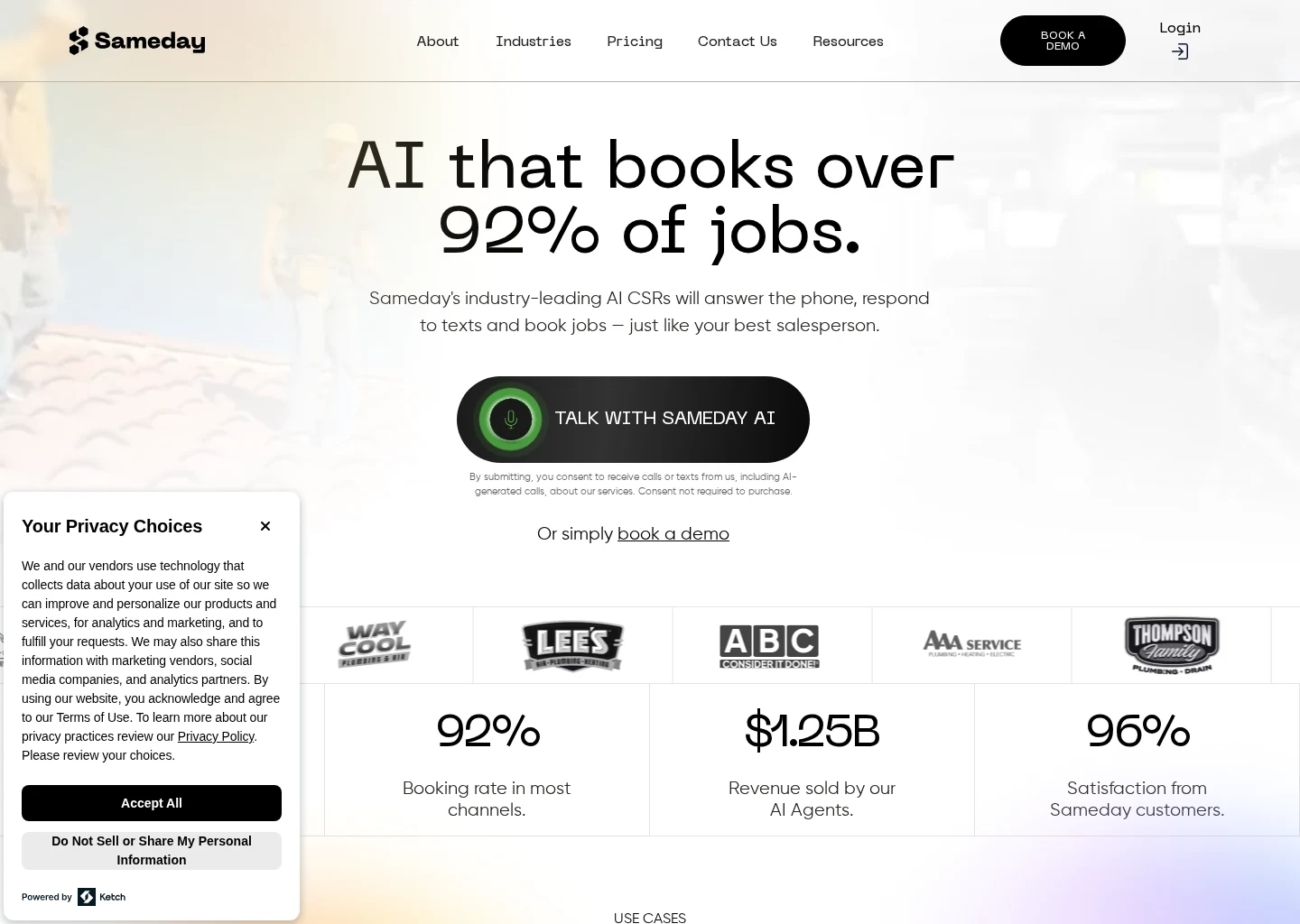
Source-backed evidence from www.gosameday.com
Captured evidence
SourceFrequently Asked Questions
Sources